
How to become an artist on Spotify is a question that will never get old! Wonder why? It’s because Spotify has always managed to stay one step ahead of all the music streaming platforms and appeals to artists with its 400 million dedicated users and lenient policies. Every artist tries their best to rise on this platform as it’s a ticket to the music industry.
So, now you get it; Spotify is a big deal for artists, but you might wonder what goes into becoming a worthy artist on this platform. Well, that’s our topic of discussion today. To make it easier for aspiring artists to establish themselves on Spotify, we’ll guide you through the whole process.
In this post, you will explore how to make an artist account and take steps to solidify your presence. And at the end, we’ll put a cherry on the top by sharing some expert-recommended tactics that you can implement to become a successful artist on your beloved platform Spotify.
How to Make a Spotify Artist Account?
To begin your journey as a Spotify artist, you first need to have an artist account to freely share your music and get access to advanced tools like stats, track editor, etc. In order to claim the Spotify artist page for yourself, you first need to have a standard account on the platform where you have already uploaded some of your tracks.
After making sure that your content is live on your account, follow these steps to claim your artist account:
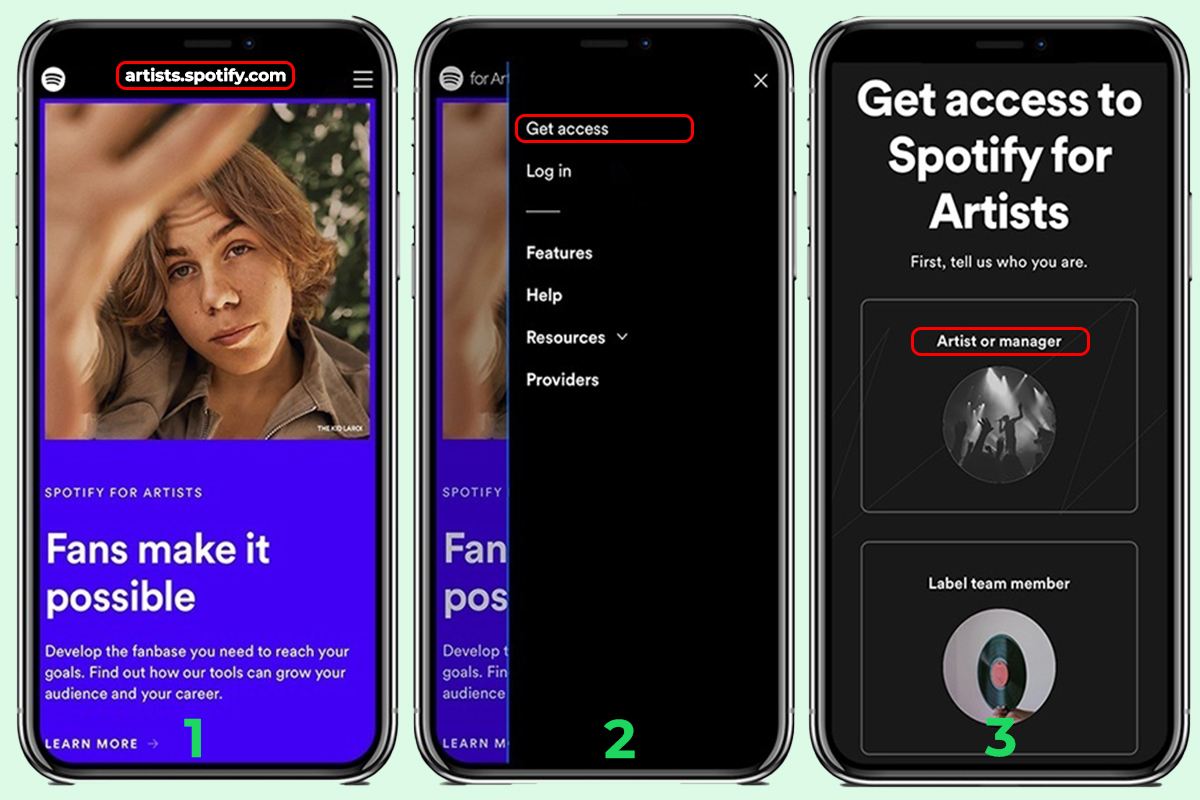
Step 1: First, search for Spotify for the artist on Google and click on the “Top Link.” Or you can simply visit artists.spotify.com.
Step 2: Once on the site, click on the “Get Access” button located in the top right corner of the page.
Step 3: Click on the “Artists or Manager” option to continue.
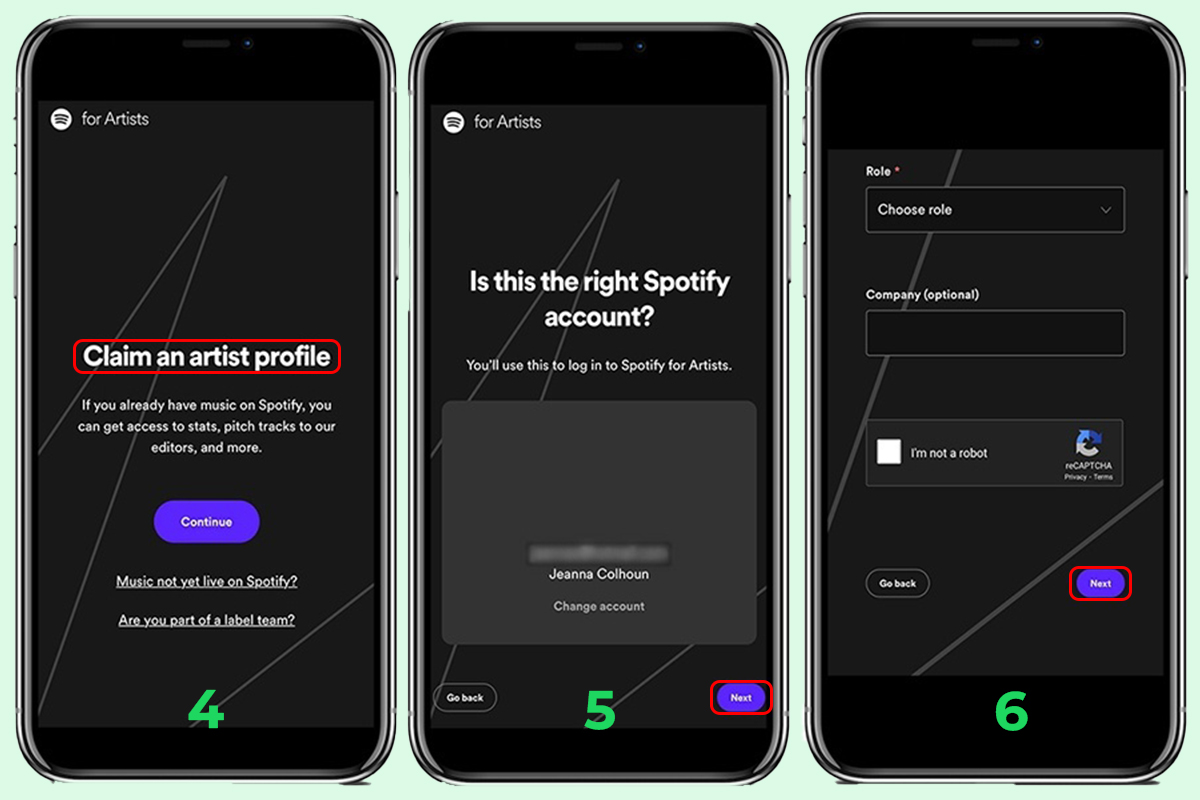
Step 4: You’ll land on a page with the heading claim an artist profile Click on the “Purple Continue” button to proceed.
Step 5: You will see your Spotify account details in the middle with the heading is this the right Spotify account on top of it. Click on the “Next” button to proceed. You can also change your account and log in with a different one.
Step 6: Now, search for your profile in the search bar on the next page and when you find it, click on it to move on.
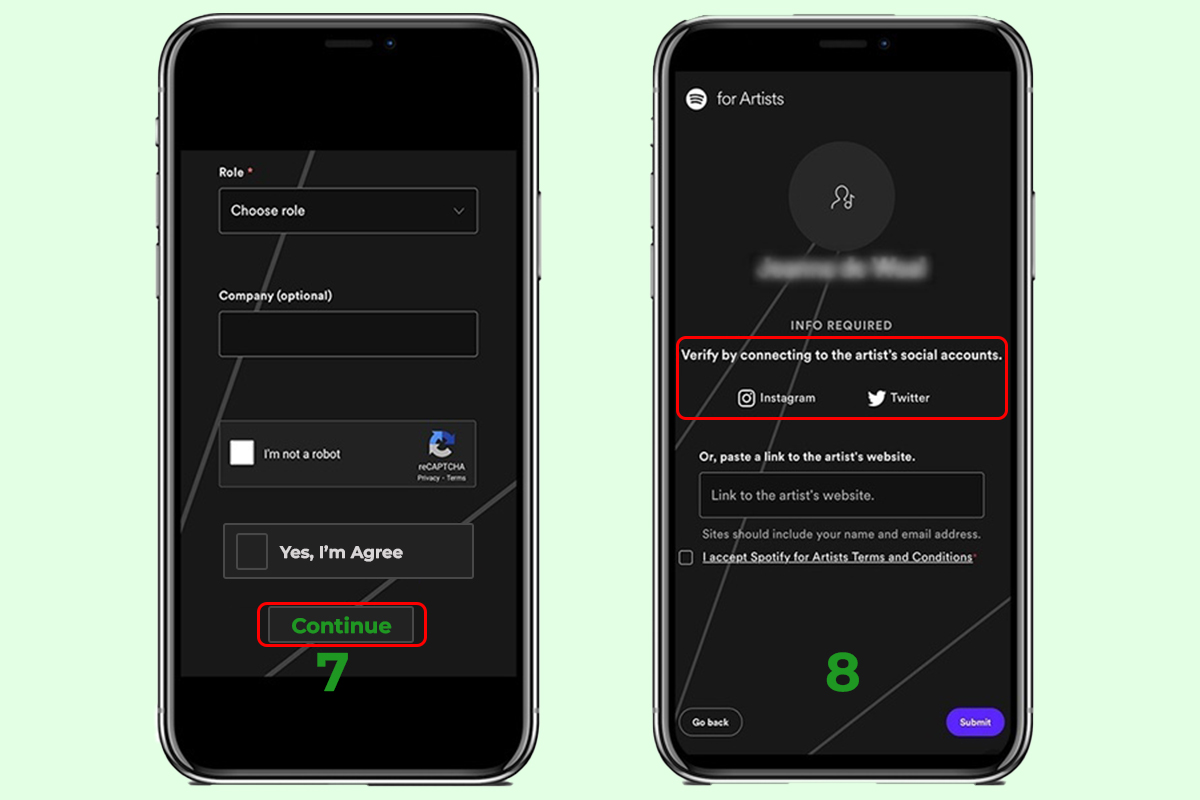
Step 7: In the next steps, you have to confirm by agreeing Yes, claim it and then clicking on “Continue.”
Step 8: You will be asked to link your Spotify profile to your official website, Twitter, and Instagram account in order to check your identity.
Once you complete the process, your application is sent to the Spotify team, and you will hear back from them in 3 days. If you get approved, you can go back to Spotify for artists, log in to your account and access the artist dashboard.
How to Get Verified on Spotify?
Congratulations! Now that you have a Spotify artist account, it’s time you move on to establish your authority on the platform by becoming a verified artist. Verified artists on Spotify are creators that get a blue tick next to their profiles, which reflects their authenticity and considerable fan following.
Studies have shown that most users prefer the tracks of verified artists, considering them big league players in the music game. That’s why getting verified on Spotify can give you a tactical edge on the platform.
Fortunately, Spotify isn’t like other music streaming platforms and doesn’t require an artist to fill out forms in order to get verified. All you have to do is claim your artist profile (like we showed you in the above section), and that’s it! You’ll get that pretty blue tick on your account simply by claiming your artist page.
That sounds easy, doesn’t it! It means that if you’ve followed the first heading correctly, you’re already a verified artist on Spotify, which is just amazing. So, now that you’re an authentic and verified Spotify creator, it’s time to see what benefits you get by going through the trouble of claiming your artist profile.
The Benefits of having a Spotify Artist Account
After you’ve claimed your Spotify artist account, you can reap a lot of benefits that weren’t accessible to you before. In this section, we’re going to explain what you can do with your Spotify artist account and how it benefits your musical career.
1. Artist Profile and Bio
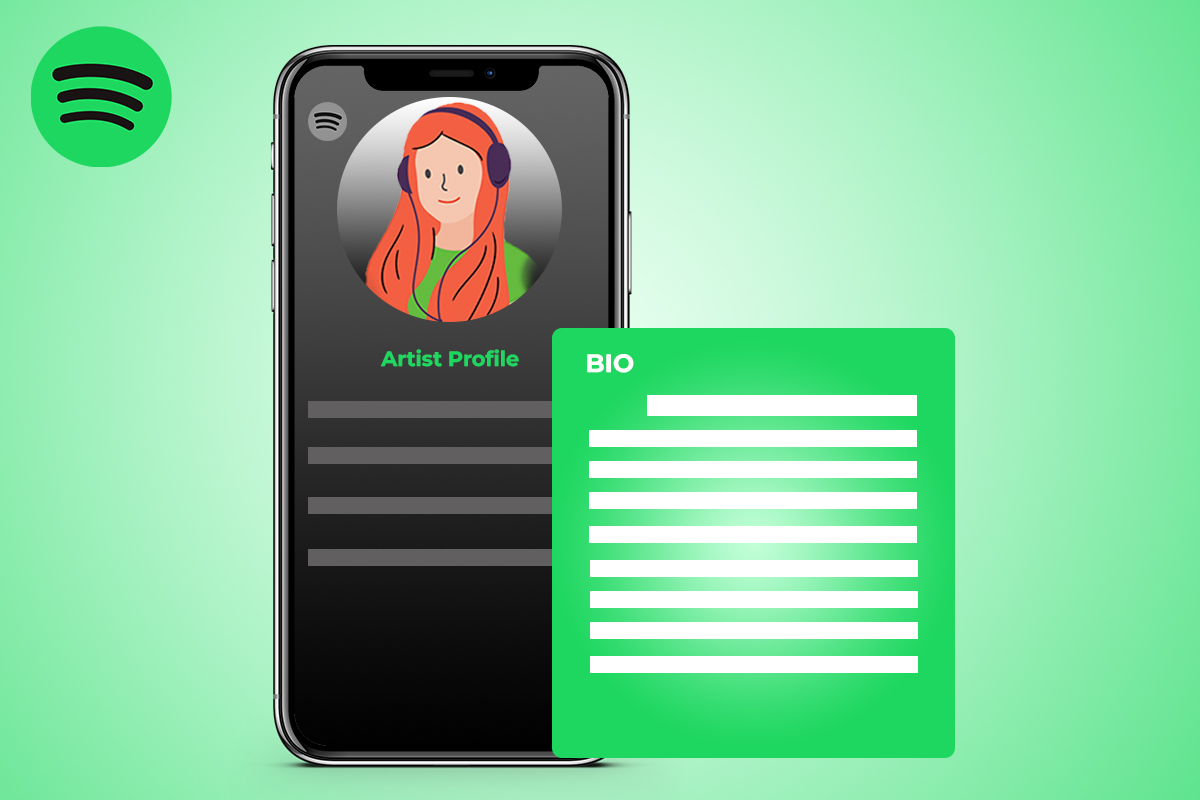
With an artist account, you get permission to edit and build your profile as an artist. Now, pay attention as this step is sensitive and, if done correctly, can really push your career to a new level on Spotify. Following are the steps you need to take in order to optimize your artist profile:
Start with Bio
As an artist, you need to define yourself and your music in the bio section. Keep it simple, straightforward, and no matter what happens, don’t try to be fake. Just write a couple of attractive and easy-to-read lines that can impress listeners and convince them to follow you.
Add Photos to the Image Gallery
Spotify allows its artists to share their creative side with their listeners in the form of images as well by giving them their own image gallery. You can upload up to 125 pictures to your image gallery, so try to fill it up to share your social and creative side with the audience.
Make a Canvas Video for Every New Release
As the release date of your new track nears, make an 8-second canvas video that can loop on your track when it gets played. Canvas videos are an excellent way to add the aesthetic touch to your music and have been noticed to boost music streams on Spotify, so you must use them.
Add Your Social Media Links
Make sure to add every single social media link on your Spotify profile so your audience can follow you on those platforms and it becomes easier for you to communicate with them. It also increases your potential organic profile visitors and followers, so it’s better to use social media.
2. Announcement
Using your artist account, you can announce the dates of your upcoming release and share them with your audience. Also, Spotify has a partnership with platforms like Eventbrite, Ticketmaster, AXS, etc. you can announce your live concert dates on them and synch them on Spotify.
However, for this to happen, you’ll need to create an account on any of these platforms and then connect it with your Spotify artist page, so whenever you update your concert dates, they also get updated on Spotify.
3. Sell Merchandising
You can make your whole link of merchandising like T-shirts, Mugs, caps, etc., and sell it to your fans by connecting your Merchbar account with Spotify. Doing this not only provides you revenue but also serves as branding, making you a well-renowned artist in the industry.
4. Submit to Playlists
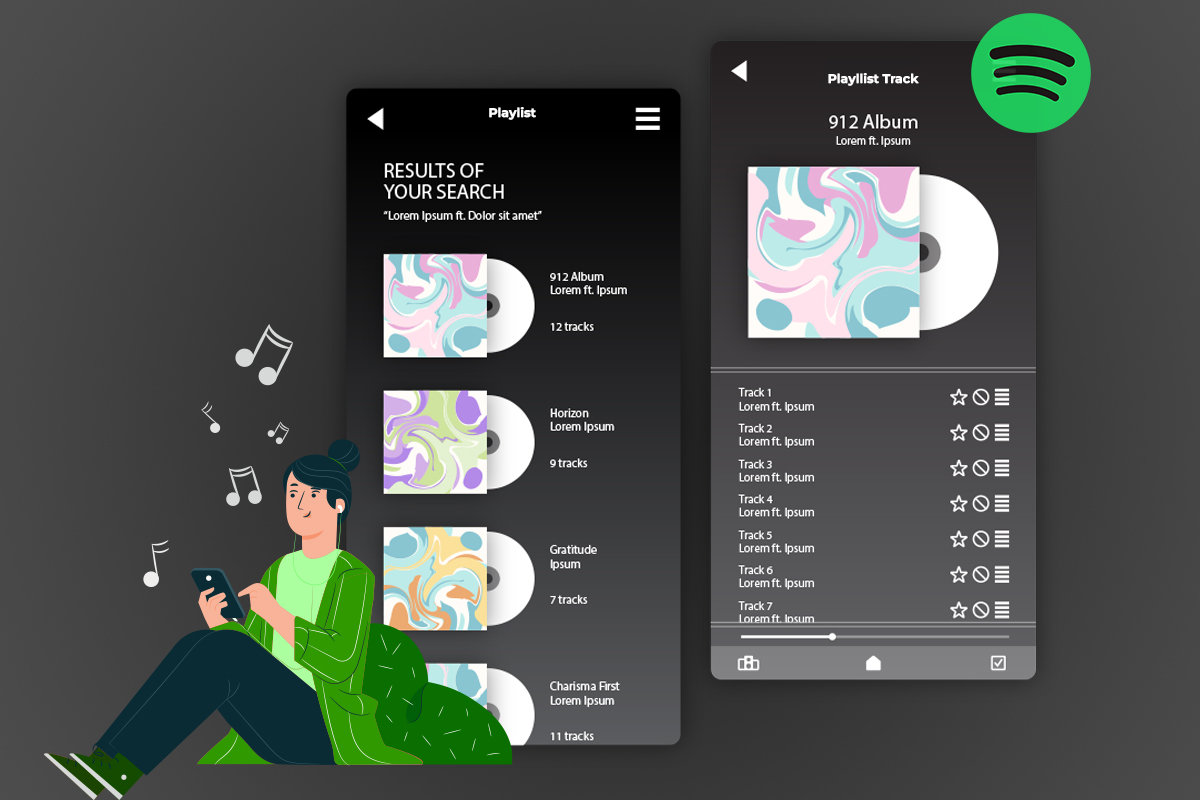
You can find playlist curators with tons of listeners and request them to add your music to their playlists. Implementing this step increases your exposure to the general audience and boosts your chances of getting recognized on Spotify for your unique type of music.
5. Know Your In-Depth Analytics
When you make a Spotify artist account, the first feature that you should access on your artist dashboard is analytics. Analytics shows you every bit of detail regarding your tracks and your overall profile stats as well.
You can monitor your number of listeners, average time spent by a listener on your track, well-performing tracks, and top tracks in a specific time period. You best keep an eye on these stats in order to comprehend where you’re lacking and to upgrade your music accordingly.
6. Artist Pick
You can influence your audience by flexing your fantastic music choice by setting an artist pick. This will give your audience something new to explore, and if they like it, your respect will increase in their hearts. Just ensure that the song you set as your artist pick must be relevant to your niche, or it might go unnoticed by the audience.
Five Simple Ways to Become a Successful Spotify Artist
Thousands of people signup on Spotify every day, but of course, not all of them get to taste the success because it’s tough to fight against the competition and rise as one true champion of a specific genre. That’s why to get you out of this pickle; we’ve brought these five expert tactics.
1. Make Spotify-Friendly Music
You might’ve heard of making excellent and creative music, but for most of you, it might be the first time hearing “Spotify-Friendly” music. Well, it is the type of music that fits well with the platform and is up to the content standards of Spotify.
To make sure that your music is Spotify-friendly, you need to keep the following elements in mind:
- Your music should be of extremely high quality.
- It should be relevant to your genre, so the audience can find it relatable.
- The audio file you upload must be in 320kbps or higher.
- Your track should have proper info added to it, including tags and hashtags, etc.
If you’ve got these basic elements down, then your music is Spotify-Friendly and will definitely perform well on the platform.
2. Buy Spotify Followers
Focus all your efforts on attracting the audience and gaining as many followers as you can. The secret to success on every music platform is building your audience and boosting profile followers. That’s where buying Spotify followers comes in; it is a strategic move.
Purchasing Spotify playlist followers not only enhances your plays, likes, shares, and engagement rate but also propels your advancement in the music industry. With bought followers, you can expedite this process, saving time and effort. It’s a quick and effective way to establish credibility, attract more genuine followers, and make a stronger impact in the competitive music landscape.
3. Share Music Everywhere
Promotion is an effective tactic to become successful on any music streaming platform. You need to share your Spotify account’s link in your circle through social media platforms or email marketing to get more traffic on your profile.
To begin, you can copy the link of your profile and start posting it on Facebook, Instagram, LinkedIn, Twitter, etc. and request your friends and colleagues to check out your music.
You can also paste the link of your Spotify profile in your email signature, so people can see it every time you mail them. Sharing will not only increase your artist profile’s traffic but will also improve its engagement rate, odds of getting followers, and new dedicated listeners.
4. Release Music Regularly
Whether you’re a solo artist working without a record label, or a big shot in the music industry, to be successful, you got to upload music to Spotify as an artist regularly.
This punctuality is crucial because the listeners always need something new from the artist, and if you don’t give it to them regularly, they might sway and start following another artist of your genre, leaving you behind.
So, try to come up with a content schedule that is realistic and doesn’t rush you in any way. Release content according to that schedule to keep your audience hooked to your content and never let them leave your side.
5. Bloggers and Journalists

Establishing and maintaining professional relations with bloggers and journalists is a fantastic way to rise in the music industry. You can work with these guys and request them to write an artist about your genre and your music.
If they agree to do so and you get featured in one of their articles, you’ll become an internet sensation, and your follower count will skyrocket. Now, this tactic requires you to invest a lot of time and even money sometimes, but since it’s quite advantageous, it’s worth a shot.
Conclusion
There are thousands and thousands of tactics to become a successful artist on the web, but there’s one thing that you absolutely need to have to achieve this goal, and that is passion.
If you keep your passion for music burning and apply the tactics we brought you; eventually, the world will start to recognize your amazing music, and your followers will increase steadily. We hope that you liked today’s article and if you want more helpful tactics like this for other social platforms, make sure to check out the rest of our blog posts.


Leave a Reply