Summarize This Article with AI


Did you know that LinkedIn has over 1.3 billion members in 200 countries? With this statistic in mind, not knowing how to build your LinkedIn profile should never be an excuse. While you may have a LinkedIn profile, have you stopped to wonder if you are using it to its full potential? In this guide, we will show you how to do that, and more importantly, how to stand out among others in your industry. Keep reading to learn more.
Key Takeaways
- Use a professional profile photo and a strong headline to make a positive first impression on recruiters and potential connections.
- Build your “About” section and experience with the right keywords to get found in LinkedIn searches.
- Use the “Featured” section and recommendations to build credibility and stand out from other candidates.
- Stay active, grow your network, and keep your profile updated to rank higher in LinkedIn search results over time.
12 Expert Tips to Build Your LinkedIn Profile to Stand Out
The following tips will guide you on how to create a LinkedIn profile to stand out, especially if you’re job hunting.
1. Use a Professional LinkedIn Profile Photo

Your profile photo is the very first thing people see. It creates an instant impression on any hiring manager looking at job candidates. A good headshot needs a neutral background and great lighting. Wear nice clothes and make sure your face takes up at least 60% of the frame.
Pages with photos get 21x more views, as a nice picture helps you stand out in any search. The LinkedIn Algorithm also likes clear photos and will show your page to more people.
2. Set a Banner Image That Reflects Your Goal
Unlike most other social media sites, this platform gives you a giant billboard right at the top to get even more creative with your visuals. Sadly, so many people just leave it blank, but that doesn’t have to be you. Use this space to showcase your personal goal.
You can design a custom background photo using any free design tool, and remember to stick to the recommended size of 1584 x 396 pixels.
3. Customize Your LinkedIn URL
Your default LinkedIn URL is usually just a messy bunch of numbers. A custom URL looks so much more professional and is super easy to share, especially as an online resume, making it easier for anyone to find you on Google.
It can also be easily inserted in your contact info on your offline resume. Navigate to the top right corner of your profile and tap the edit icon on “Public profile & URL”, then enter your desired text.
4. Write a LinkedIn Headline That Works for You
Every profile on LinkedIn must have a headline, as it’s your first pitch to any profile visitor. A weak headline just says interested in new job opportunities. Instead, use this winning formula: Role + Value + Keywords. A strong example is adding your job title and value, like “Marketing Pro | Helping Brands Grow”.
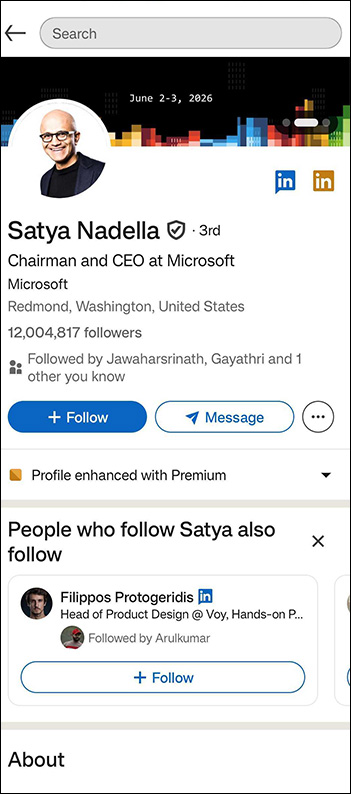
Take an example Satya Nadella, whose LinkedIn headline is “Chairman and CEO at Microsoft”. Anyone could type that into a search engine or even LinkedIn’s search, and Satya’s profile pops up first.
5. Craft a LinkedIn “About”Section That Tells Your Story
The “About” section on LinkedIn is your chance to make a strong elevator pitch with a few sentences, up to 2000 characters in summary. It helps increase impressions on LinkedIn while telling visitors more about your unique skills. A simple trick is to write with the 4-part structure: hook → skills → value → CTA, and insert keywords naturally.

Take an Example of Richard Benson’s About section. He wrote in first person and highlighted all professional achievements, while inserting relevant keywords in his field.
6. Build an Experience Section That Shows Impact
This section showcases your work history and professional experiences over the years. It should read like achievements, and not just a list of your past roles or a mere job description. After mentioning the company, add details in the description using bullet points and action verbs.
Use statistics to display the results from your work. You can also attach links to your portfolio or images to highlight real work achievements.
7. Add the Right Skills and Earn Endorsements
When a recruiter looks for job candidates, they check your skills section. It is a huge part of your page. Add relevant skills that match your career path and show up in recruiter searches. You also want to earn endorsements for your new skills, and the easiest way is to give them to others first.
Having the right skills means you show up faster in a search and get seen by more recruiters.
8. Get Recommendations That Build Credibility
The strongest form of social proof you can get on LinkedIn is through recommendations, which serve as feedback for potential employers. From your profile, tap the plus icon in the recommendations section and select “ask for recommendation.” Alternatively, visit a connection’s profile, tap on “more”, then “Request a recommendation”.
It’s often best to request recommendations from a colleague in your company or a direct manager. This helps build professional credibility and is more convincing than anything you write yourself.
9. Use the Featured Section to Showcase Your Best Work
The “Featured” section sits right under your headline and “About” section. It is the first big visual area people see. To stand out, pin your top posts, links, portfolio pieces, media, or even PDFs. Most people leave this section empty unknowingly, which gives you a better chance in the job market.
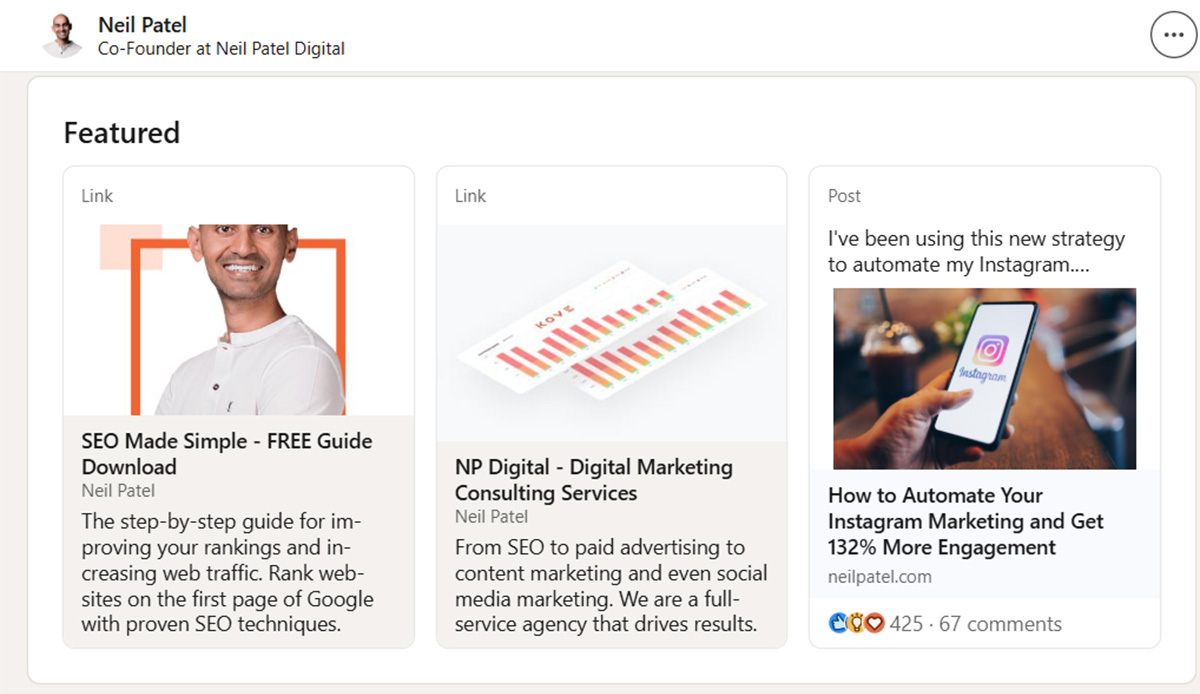
Take an example of Neil Patel’s LinkedIn page. He added two relevant content from his website and a well-performing post from his LinkedIn account.
10. Turn On Open to Work

If you’re looking for new job opportunities, you can stand out by turning on the “Open to Work” feature. Choose between adjusting the visibility settings to recruiter only or all LinkedIn members, in which case a public badge is displayed over your profile photo.
This announces to recruiters that you are interested in and actively looking for a new job. You can improve your job hunting experience with this simple action and increase the number of messages you get from recruiters.
11. Keep Your LinkedIn Profile Active
A faster way to rank higher in LinkedIn search results is by keeping your profile active. This means regularly updating your profile with new skills, sharing posts on your LinkedIn feed, and you can even share articles on relevant topics while using a trending LinkedIn hashtag.
More importantly, learn the best time to post on LinkedIn to encourage more activity from your connections. By regularly highlighting your continuous learning, you keep your profile visible to recruiters and your connections over time.
12. Build Your LinkedIn Network

At the end of the day, an optimized profile doesn’t mean much if you’re speaking to an empty room. Surrounding yourself with the right professional network is what actually gives you credibility when a recruiter lands on your page. Start hunting down folks you genuinely share common ground with.
And instead of just using the default “Connect” button, take two extra seconds to write a personalized note. It dramatically boosts your chances of getting a “yes”.
For a much easier and effective approach, you can buy LinkedIn connections to quickly build your social proof. This saves you the workload of trying to build from scratch, when you can already start competing with a high credibility from day one.
Common LinkedIn Profile Mistakes to Avoid
Here are some mistakes to avoid on your LinkedIn profile page:
1. Avoid Overusing Buzzwords on Your LinkedIn Profile
Try as much as you can to avoid buzzwords, and this includes overused words like “passionate”, motivated, and results-driven. While they sound appealing, they don’t exactly add real value to your profile. Instead, you can use words related to your field and skills.
For example, a Digital Marketing expert can use keywords like “SEO expert”, “Analyzing data”, etc.
2. Avoid Keyword Stuffing Your LinkedIn Profile
As important as keywords are, you shouldn’t use them too much in your profile, as it could make it hard to read. Insert them strategically and naturally across key sections such as your headline, “About” section, and “Experience” section, for the best results.
3. Avoid Using an Outdated LinkedIn Profile
Having old job titles or past companies on your page is a bad look, as it sends the wrong signal to anyone wanting to hire you. You must keep your account updated to stay relevant. Showing your newest skills and continuous learning, for example, helps you pop up in search results.
4. Avoid Ignoring LinkedIn Connection Requests
Leaving connection requests sitting in your inbox hurts your account. It slows down your network growth and ruins your profile engagement. When you reply to people quickly, it signals to LinkedIn that you are an active user. This simple habit really improves your overall profile visibility.
5. Avoid Having No Activity on Your LinkedIn Profile
A profile with zero posts or comments looks totally dead to recruiters. The algorithm will simply ignore you if you do nothing. Even tiny actions help. Try to comment on just one post a week or share relevant content. This tiny step brings major visibility.
Build Your LinkedIn Profile and Stand Out
The three strong pillars of building a unique LinkedIn profile, whether as an individual, include having a strong profile, the right features, and consistent activity. We’ve covered how to achieve all these in this guide and make your profile appealing to recruiters and other users. Take the first step today in applying these tips and make LinkedIn work for you and your career!
FAQ
1. What Is the Most Important Section of a LinkedIn Profile?
While every section is important, your profile picture and headline are the first things your potential employers see.
2. How Often Should I Update My LinkedIn Profile?
Keep your profile page updated every three to six months, or as needed, especially with new experiences.
3. Can I Build a Strong LinkedIn Profile Without Work Experience?
Yes, you can. As a recent graduate with no previous job offer, simply share your skills and the work you’re interested in.